Pages

Sunday, March 24, 2013

Field Navigation: GPS

Introduction:

In continuation with the past two week’s activities (creating a map of the navigation area and navigating using a map and compass), our task this week was to navigate the Priory in Eau Claire using only a GPS unit. The main objective of this activity was to analyze the efficiency of using a GPS unit to find points. We were also interested in comparing the efficiency of the GPS unit to the efficiency of a map and compass (distance and azimuth) to find points as we did last week. Each technique has its benefits and drawbacks. The GPS is easier to understand, but our navigation was less direct than with the map and compass. The GPS functions were not entirely accurate either—the compass in particular was unreliable.

For this activity, we were working with the same groups of three students and within the same area in the Priory as last week. However, we were given a different course than we had last week with six different navigation points to find. There was a total of six groups of three students. Two groups were assigned to each course of navigation points working in opposite directions.

Each person was provided with their own GPS unit, an etrex Legend H by Garmin (Figure 1), and coordinates of the points in UTM and latitude/longitude. We were able to find the points by comparing the given coordinates and the coordinates on our GPS units. Each group of three worked together to find their assigned points despite the fact that every individual had their own materials. We used the track log function of the GPS units to record our positions in the field (further details in the Methods section) to see how directly we traversed between points as well.

Figure 1: This is the Etrex Legend H GPS unit by Garmin that we used to do our GPS navigation for this week.

http://www.bing.com/images/search?q=etrex+legend+h&FORM=HDRSC2#view=detail&id=6FBC3D626A712DF56E5A5D4AA51FAB58F6C6CA08&selectedIndex=1

Methods:

Before we were able to begin finding our points, we had to set up the track log function on our GPS units. The track log records the location of the GPS at a fixed time interval. For this activity, the units were recording our locations every few seconds. The time interval varied slightly between units, however, because we did not establish a decided interval before navigating. The track log was very simple to set up—we turned it on when we wanted the unit to begin recording and turned it off when we were done. It was important to make sure we turned the track log off after we finished our navigation because we would have far too many irrelevant points otherwise. We also had to make sure we had enough battery life for our GPS units before setting off.

Once we started the tracklog, we began searching for our points. With only the GPS to guide us, we were very limited. The GPS could provide the coordinates of our current location and a compass. However, the compass was extremely inaccurate and could not be relied upon.  We had our coordinates set in UTM and could orient ourselves by comparing the coordinates of the points to the coordinates on the unit (Figure 2). Knowing that our origin in the UTM coordinate system was to the southwest of our study area, we determined that the higher the X coordinates went, the further east we were traveling and the higher the Y coordinates went, the further north we were traveling. We had to test which direction we were traveling simply by walking in a certain direction and seeing if the coordinates were getting higher or lower. We would navigate to each point by comparing the coordinate values from one point to the next. For example, if Point 2 had a higher X coordinate value and lower Y coordinate value than Point 1, we would walk southwest by going in the direction that would give us higher X values and lower Y values according to the GPS. This was simple conceptually, but it proved to be tricky in the field. We eventually decided to get as close to the Y coordinate value of the point as possible first, and then try to match the X coordinates.
Figure 2: This is the data, given to us by our professor, that we used to find the  points for Course 3. We matched the GPS coordinates to the coordinates in this table to locate the points.

The next step was to load the track log points and save them as a shapefile. I connected my GPS unit to a computer using a USB cord and loaded the data into a program called DNR GPS. The program was relatively intuitive. It was important to remember to save the data in the correct coordinate system and as a point shapefile rather than a line which was the default. After saving the data as a shapefile, I created three maps of the track log data using ArcMap—one for my track log points, one for my group, and one for the entire class.

Figure 3: This is the map of my track log data. As can be seen, I was not traveling directly from point to point.

Figure 4: This is a map that includes the three track logs from my group. The track logs follow a similar route but are not exactly the same.
Figure 5: This is a map of the class track log data. It is sorted by the different courses and shows that there were many different paths taken to get to the same points.


Results:

In comparison with last week’s navigation exercise, using the GPS seemed to be much more difficult than using the map and compass. Without a map and properly working compass, it was hard to orient ourselves, and we found ourselves looping around our own tracks—those woods began to feel like the twilight zone after a while (Figure 6). As seen in Figure 5, there was a lot of variation between groups that were navigating the same route because it was hard to keep track of the direction we were traveling. There was variation among the track logs within our group as well, which may be due to problems with the GPS units or slight variation in the paths we were taking (Figure 7). Without the luxury of a map we also were unable to anticipate the type of elevation changes and terrain we would be going through. We found ourselves crossing a rather steep gorge at one point. The upside to the GPS unit is that it can be quick to set up and easy to understand. The track log function is another added benefit to a GPS because it can record exactly where the user is traveling, and the data can be used to create maps.

Figure 6: This is the area that we looped around to get to Point 4. We went around this loop  clockwise meaning that we went way out of our way to get to the point and crossed our own tracks on the way to Point 5.

Figure 7: This is one example of an area that the track logs varied among my group. It is also showing the difference in the time intervals that were used. The yellow track log (mine) had a time interval that was larger than the other two so the points are more spread out.

There we similar challenges between this week and last week in terms of the nature of the field. There was quite a bit of snow cover (Figure 8), though somehow there was even more snow than last week (I remembered my snow pants this week though—score!). The brush was also bothersome. Unfortunately, keeping an eye on the GPS meant that I was not looking out for tree branches and walked into a couple solid branches along the way. We had to navigate around certain features in the field as well, which threw off our navigation as we lost track of the direction we were going.
Figure 8: This is a photo of one of my group members walking through a clear area in the Priory. It  gives a slight idea as to the depth of snow we were walking through.


Conclusion:

This week’s activity consisted of using only a GPS unit to navigate in the field. We learned how to use the track log function on the GPS to record our locations and save the data as a shapefile to be used in ArcMap. Working in groups of three, we navigated to six points in a large wooded area by matching the coordinates on our GPS units to the given coordinates of the points. We found that using a GPS has both benefits and drawbacks while navigating. I thought that the GPS was more difficult to use than the map and compass for navigation because we could not orient ourselves properly and were less aware of our surroundings. We were definitely not travelling directly from point to point as we were with the distance and azimuth technique because of this.

Sunday, March 10, 2013

Field Navigation: Distance and Azimuth


Introduction:

The purpose of this week’s activity was to learn how to navigate in the field using traditional methods—distance and azimuth. Azimuth is the angle between magnetic North and a point on the Earth's surface. Using the maps we made last week, a compass, and the coordinates of certain points, we were able to find these specific points in the field. We were given a laminated card to punch at each point so as to prove that we navigated to all of the correct points. The field for this activity was a hilly, wooded, one hundred acre plot known as the Priory in Eau Claire (Figure 1).  Though we ran into several road bumps along the way, my group was able to find these points relatively easily.

Figure 1: This is an aerial photo of the Priory in which we were to find our points.

Methods:

Before we were able to go out into the field, we had to plot our points and learn how to use the compass to find azimuth. We were given six points in a course with their X and Y coordinates (in a UTM coordinate system) to plot on the maps we selected from last week. Unfortunately, the maps we chose to use either did not include a grid system, or the grid system was in the wrong coordinate system. My map was the one that was in the incorrect coordinate system. Though I could swear I had the grid in UTM, it clearly was not, and couldn’t be used for navigation (Figure 2 and Figure 3). We were forced to use an extra map our professor had printed out (which was lucky that he had done so) instead (Figure 4).

Figure 2: This is a portion of my elevation map used for the field navigation. As can be seen with the labels on this grid, the coordinate system is not in UTM like Figure 2. The coordinate system here is unknown.
Figure 3: This is a portion of my elevation navigation map for the Priory that is in the correct coordinate system--UTM. The labels here are correct and can be compared to those in Figure 1.

Figure 4: This is the map we ended up using to do our mapping. It was created by another student and is in the correct coordinate system.
Once we had a suitable map, plotting the points was fairly simple. Our points were on the second course of three created by our professor. Since we had six groups of three people in our class, two groups were assigned to each course. For each course, one group would navigate the points in numerical order, while the second group would go in reverse order. We walked the points in numerical order. Once we knew which points we were assigned and which direction we would be navigating them, we were able to match the UTM coordinates given to us by our professor to the X and Y coordinates on the map (Figure 5). The grid on this map was fifty meters by fifty meters, so we had to do some estimating for the location of the points, but we were fairly confident that the points were in the correct location. Each group member located the points individually and then compared them to the others in order to ensure that the points we plotted were as accurate as possible.

Figure 5: This is a table of the relevant information for each of our navigation points in the Priory. The last point does not have distance or pace information because these were not necessary to find our way back to the main building on the plot.

Next, we learned how to use the compass. The steps to finding the azimuth from one point to the next on our map go as follows:
  1. Draw lines from one point to the next on our map. This makes it easier when it comes time to measure the angle and distance.
  2. Line up North on the compass with the top of our map. The grid lines we had on the map were not perfectly straight and couldn’t be used as a reference.
  3. Line up the black arrow on the compass with the line drawn from point to point (Step 1).
  4. Find the correlating angle. If the black arrow is lined up correctly with the line from point to point, and the North on the compass is pointing towards the top of the map, there should be an angle number indicated by a small white line on the compass that is the azimuth from one point to the next.


Figure 6: This is a picture of the compass we used to do our navigation in the Priory. 
http://www.target-master.nl/images/Silva%20Polaris%20177.JPG

We repeated this process between each of the six points, working from one point to the next in the direction we would be walking, and then from our last point back to home base. We double checked our angles for each point to ensure accuracy as well. Because our magnetic declination (the angle between magnetic north and geographic north from a certain point on Earth) in Eau Claire is practically zero, we did not have to adjust our compasses for this.

The next step was to determine the approximate distance from one point to the next. We used the scale bar included with the map to make tick marks on a blank piece of paper with labels indicating the distance they represented. Then we lined up the marks on the paper with the lines we drew between points to find the distance. We weren’t overly concerned with the accuracy on this, because we knew that if we were following the correct azimuth, we would eventually find the next point. It was just nice to know about how long we would be traveling between points. The distances ranged from about seventy meters to two hundred and seventy-five meters (Figure 5).

We then determined the role of each member. One member would need to use the compass to find the azimuth and direct the other two members (reference Figure 6). This also required several steps to follow:
  1. Line up North as labeled on the compass turntable with the black heading arrow.
  2.  Hold the compass flat and away from your body or any metal objects as they can throw off the compass needle.
  3.  Keep “red in the shed”. This means that the red part of the compass needle should be within the red North arrow on the compass turntable.
  4. Find the correct azimuth for the points you are navigating between and direct other members in that direction.

Another member would “scout” ahead in the direction indicated by the member with the compass to a landmark and line up perfectly with the azimuth. Then, the third member would use their pace count and walk towards the second member in a straight line. The pace count was used to approximate our distance in the field. A pace count is the number of steps taken over a specified distance which is usually one hundred meters. We found our pace counts last week outside of the science building. The team member that had the most consistent pace count out of three trials was selected to use their pace count in the field. Kory had the most consistent count--around sixty-five steps per one hundred meters.
.
Finally, we were ready to head out into the field. Our professor led us to our first point—a dumpster in the parking lot outside of the main building on the Priory property. From there we went out into the woods to find our points. This went pretty smoothly. Our distances and azimuth values were accurate and we could usually see the points from about twenty meters away. The points were marked with blaze orange flags which stood out very clearly against the snow on the ground. We then punched our laminated sheet to prove that we navigated to our points. Each point had a unique punch so it was clear whether or not we went to the correct points. We followed the same procedure for all points.

Discussion:

As stated previously, our navigation went pretty smoothly once we were out in the field. The most difficult part of being in the field was simply fighting against the snow. We had the great fortune of being out in the field in the beginning of a snow storm (though it truly wasn’t too bad). The area we were navigating was very hilly with a lot of brush and snow cover, so we had to be careful not to slide down any hills or step in any holes. I also whacked my head against quite a few branches along the way and snapped a few branches into the person behind me. We had to look out for bears that are notorious for living in this area as I informed my team member from Milwaukee as well.

The nature of the field posed a bit of a problem for the pace counter, as well. The count was not entirely accurate because the pace counter had to walk over uneven terrain and work around trees. Luckily, we still had fairly accurate counts and didn’t have trouble finding our points. Another problem we had to work around was a large, fenced-off pond of sewage that was in the path between two of our points. Our team did not like the idea of walking all the way around the pond, so we opted for hopping the fence and walking adjacent to the pond, though we had to adjust the pace count slightly. We did this by only counting the steps taken in the direction of the next point, and not those taken perpendicular to the path.

The greatest challenge we had to face, however, was working around the fact that our maps were pretty much useless because they were in the incorrect coordinate system or didn’t have a grid. We would not have been able to find any of our points if there weren’t extra maps to be used. This underlines the importance of ensuring that data is in the correct projection and coordinate system—something that is so easy to overlook while working in ArcMap due to on-the-fly projection. After the navigation was over, I corrected my maps and made sure the grid was in the right coordinate system (Figure 7).


Figure 7: This is the elevation map that I created for the Priory with the correct coordinate system for the grid.

Other than this error, however, I would not change our selected maps. They were clear yet informative. We ended up bringing our maps out into the field for reference along with the map with the plotted points, and they proved to be somewhat helpful. Having the contour lines was perhaps the most useful in finding our location. We could compare areas on the map where the contour lines were bunched together to the steep hills we were walking over. The aerial image was also valuable—in one instance we were able to find our location using landmarks like the freeway and tree line on the map.

Conclusion:

Navigating a field using simple methods is extremely useful for a geographer. As stated in previous activities, one can never fully rely on technology, and a back-up plan should always be lined up in case of any difficulties. As we learned this week, distance and azimuth can be used to navigate a field very accurately. With only a compass and map, my group and I were able to find five different locations over a one hundred acre plot with few complications. The most important lesson I learned from this activity was ensuring that my data is in the correct coordinate system. The activity would have been impossible to complete if we weren’t given an extra map to use because my grid was not in the UTM coordinate system and the points could not have been plotted.

Sunday, March 3, 2013

Field Navigation Maps


Introduction:

Our focus for class this week was to create a field navigation map. We will be using this map along with a compass to locate specific points in a wooded area known as the Priory in Eau Claire next week.  Working in groups of three, we each created two maps and later narrowed it down to two maps that we liked best. There are certain challenges that arise while making a map—one of which is balancing the amount of information included so that it has the proper amount of information and doesn’t overcrowd it. Another challenge is finding, choosing, and managing the data to suit the purposes of our project. As we went about making our maps, we encountered these issues and were able to work around them to produce useful navigation maps.

Methods:

Obtaining the data:

In order to save time and allow us to focus on the creation of our maps, we were provided data for the priory in a geodatabase created by our professor. The data included two foot contour lines(Figure 2), five meter contour lines (Figure 1), a DEM, outlines of the mapping area, and aerial photographs of the priory. If we were to find this data on our own, it would have been much more complicated. The aerial images came from a USGS seamless server and the five meter contour lines were derived from the DEM also provided by USGS. The two foot contour lines were taken from a University of Wisconsin-Eau Claire survey of the priory shortly after it was purchased by the university.
Figure 1: This is the line feature for the five meter contour lines. I wanted to compare the five meter contour lines and the two foot contour  lines to show the difference in detail. It was used in my final aerial map.
Figure 2: This is the line feature for the two foot contour lines. It is much more detailed  than the five meter contour line and was used in my final elevation map.

Preparing Data in ArcGIS:

Again, we were fortunately provided with the data already formatted for the most part by our professor. However, if were to obtain the raw data, we would have to take several steps before we could work with it in ArcGIS. Firstly, we would have to make sure the data was in a file format that can be used with ESRI products. If we were to create the two foot contour lines for example, we would have had to extract them from the DEM and save them as a separate line feature. Then, we would need to make sure all of the data is in the projection we wanted. We chose to use UTM as our coordinate system as opposed to a geographic coordinate system so as to reduce distortion for our area of interest, the priory, and have map units that can be measured. UTM is much better suited for large scale projects like the one we are working on. The zone for our area is UTM Zone 15 North.

For the most part, we did not have any issues with the projection of the data as on-the-fly projection in ArcMap corrected the differences in coordinate systems (five meter contour lines were in GCS North American 1983, aerial was in NAD 1983 Wisconsin Transverse Mercator, navigation boundary was in NAD 1983 UTM Zone 15 North). The on-the-fly projection uses the coordinate system of the first feature brought into ArcMap and sets each subsequent feature to the same coordinate system so they may be viewed together. We did run into some problems with the two foot contour lines, however, because they had an undefined coordinate system. Therefore, they were unable to be projected using on-the-fly and would not be displayed with the other data. We were able to resolve the issue by starting a new ArcMap session and adding the two foot contour lines immediately after adding the clipped aerial image. In this case, ArcMap was able to use the on-the-fly projection for the two foot contour lines. The layer coordinate system was set to UTM so that the grid had the correct units and all the layers were in the correct context.

Creating the Map:

Once these steps were taken to prepare the data, we were able to start making our maps. Before deciding on making two maps, I tried to make one map including all of the features I thought pertinent (Figure 3). After seeing the result, an extremely congested map, I created two maps each to be used for a slightly different application. My first map was centered on the aerial photograph of the priory (Figure 4). I added the five meter contour lines so as to have a general idea of elevation and a polygon outlining even more specifically the area that we will be working in. I also included a twenty by twenty meter grid to use as a reference. I had previously chosen a ten meter by ten meter grid, but this was unnecessarily small and crowded up the map.  My second map centered on elevation of the area (Figure 5). I used the DEM and the aerial photo, but set the aerial at a fifty percent transparency so that only major features were visible (Compare Figure 6 and Figure 7). I also added the polygon and grid for this map so as to more easily compare specific points with my first map. Each map also includes a scale bar, north arrow, information on sources, and coordinate system information.

Figure 3: This is a map that includes all of the data given to us from our professor to create a field navigation map of the Priory in Eau Claire. As can be seen, this map is very cluttered and difficult to read.


Figure 4: This is one of my final maps for the field navigation project. It  is based on an aerial photograph of the priory.


Figure 5: This is my other final map for the field navigation project. It is based on elevation data of the priory.
Figure 6: This is the DEM I used to make the elevation map in Figure 5 before I  added the aerial photo. It is difficult to ascertain any sort of position on the map and would still be even if a grid were provided.
Figure 7: This is the DEM with an overlay of the aerial photograph of the priory for the field navigation project. It is much easier to locate a position as compared to the DEM in Figure 6.


Final Selection/Results:

For our final maps, my group and I had to decide which maps would best suit our needs in the field next week. In comparing our maps, we noticed that they were very similar and the selection came down to very fine details because each map included the same features in the same format.. For our aerial map, we chose another group member’s because it was cartographically pleasing (Figure 8).  For the elevation map, we chose the one I created simply because it had the aerial overlay to more easily compare maps (Figure 5).
Figure 8: This is the final aerial map created by my group member Kory Dercks for our field navigation project.

Conclusion:

Through the creation of our maps, we learned that there is quite a bit of work that goes into creating an accurate and efficient map. Collecting data can be complicated as it can come from many different sources and formats. Projecting the data is another very important element in making a map, as we learned after encountering issues with the two foot contour lines. Lastly, it is vital that the map has a sufficient amount of data without overcrowding the map. It must be easy to read while still including all the information necessary for the map reader. We will be testing the two maps our group chose as we navigate the priory next week. 


Sunday, February 24, 2013

Distance Azimuth Survey


Introduction:

Unfortunately, field work does not always go as planned—weather may be a hindrance or perhaps the field equipment necessary is unavailable or not functioning. In order to work around these situations, a back-up plan must be at hand. In this exercise, we are using an alternative, “back-up” mapping technique—azimuth and distance data collection—so we may be prepared for any problems with more advanced equipment. The general idea is to find a base point and map all other features in relation to this base point using distance and azimuth. There are a couple of ways to approach this type of mapping based on the different tools used. One approach is to use a compass and distance finder while the other is to use a laser device that will measure both distance and azimuth. This information can later be mapped as point features in ArcMap or another GIS. To keep it relatively simple, we are only mapping point features in a 50 meter by 50 meter area somewhere near/on our campus.

Methods:

Concepts:

Azimuth: Azimuth is the measurement of an angle on a spherical plane or in a spherical coordinate system.

Magnetic Declination: Magnetic declination from true north is often a factor when collecting data using a compass. True north, or magnetic north, is not always in the same direction as compass north. The declination measures the angle between true north and compass north from a certain point on the globe. It varies with geographic location and also changes over time. If the declination is not accounted for while collecting data, the location of the features that have been mapped will not match up with the actual features in the real world. Luckily for us, the magnetic declination for the city of Eau Claire is insignificant. Magnetic north in Eau Claire is 59 minutes west of compass north; therefore, we did not have to account for the declination while using the compass.

Data Collection:

               Measurement techniques:

Before we were able to begin our own projects, we had to learn the advantages and disadvantages of the measuring techniques and how to use them. With both of the methods, a point of origin must be established from which to measure the distance and azimuth. The first technique includes using a compass to find the azimuth from the point of origin and a distance finder to measure the distance. By holding the compass up to our eyes while also looking at the object, it was fairly simple to find the azimuth. The distance finder was also simple to use. It has two parts—a receiver and a “shooter”. The receiver should be held near the object that is being mapped and the shooter will compute the distance by pointing it at the receiver. The second technique is using a laser gun that can record both the azimuth and the distance of the object in question. It only needs to be set to the correct setting and pointed toward the feature.
               Both of these measuring methods have advantages and disadvantages. The first method using the compass and distance finder can be inaccurate because it relies heavily on human judgment. It is also more difficult because it requires two tools rather than one and at least two people to measure the distance. However, it requires the least amount of technology and can be used in many different situations. The second method, involving the laser gun, is much more convenient because it only relies on one tool and can be done with only one person. The downsides to the laser include a greater dependence on technology and it can be harmful if pointed at the human eye.
               Once we had learned about the techniques, we headed out to collect a few points outside of our science building. We chose a tree as our point of origin from which to measure the rest of the points. We were in an area that had a few sculptures and trees placed between the building and a large parking lot. We tried out both techniques on these points and found that they had slightly varied measurements—likely due to human error in finding distance and azimuth.

               Area:

              The first step in this project was to select an area near or on campus at our university that has a general size of about ¼ of a hectare (50x50 meters) with a significant number of features to be mapped. We chose a small area behind one of the dorm buildings that is part of a disc golf course (Figure 1). We chose this area because it seemed to have an ample number of features to be mapped. The area is near the edge of a large hill with a steep drop off and has a triangular shape. Though it is covered in snow this time of year, in the summer most of the area is covered by lawn with trees spread throughout. It has a small picnic area and a couple holes for the disc golf course.

Figure 1: This is a photo of the disc golf course area we were surveying with the azimuth-distance method. This photo was taken from the perspective of our origin point.

             Data Collection:

            Next, we had to actually collect the data. Instead of choosing only one method of data collection, my group and I paired up with another group and did both techniques for the same area. We thought it would be interesting to compare the two and see the geographic differences. The point of origin was established at the back corner of one of the buildings framing the area. With the compass and distance finder, we had one person go to each point and hold the receiver so we could record the distance from the point of origin and had another finding the azimuth using the compass provided to us by our professor (this compass did not need to be adjusted for the magnetic declination as mentioned previously). A third person was in charge of using the laser gun which recorded both distance and azimuth, and the last person recorded the data for both methods. This took about an hour to complete as we had to get a bit imaginative in finding a sufficient number of points. 

            Data Management and Mapping:

           After going out into the field, we had to enter in our data into an Excel file and ArcMap. The Excel file contained five categories: point number, X and Y coordinates, distance, azimuth, and point description. The description was kept fairly simple—most points being trees (Figure 2). The X and Y coordinates for every point were the decimal degrees of the point of origin. We found the coordinates using Google Earth, though this is an imperfect method of finding the coordinates. In ArcMap, we uploaded the Excel file and saved the data point of the origin as a feature. Once this was accomplished, we used the Bearing Distance to Line tool in the Data Management toolbox to create lines with vertices ending where each data point should have been in relation to the origin. This tool takes the distance and azimuth field and creates a line from the origin at the appropriate distance and angle for each point (Figure 3). Then, we used the Feature Vertices to Points tool. This tool simply creates a multipoint feature with the points being at the vertex of each line. Lastly, we added a basemap of our area so as to see the relation between the real-life features and the point features we mapped in the field.
Figure 2: These Excel files contain all of the data for the points we collected in the distance-azimuth survey. The table on the right has the data collected using the laser technique while the table on the right used the compass and distance finder.
Figure 3: This map shows the results from the Bearing Distance to Line tool. The lines are arranged so that each entry in the Excel file has the appropriate distance from the origin and azimuth from the origin.


Results:

               The results of this survey were not as accurate as I had hoped. Most of the points are relatively close to their features; however, for a map with this large of a scale, it is not sufficiently accurate. There was also a lot of discrepancy between the results for each method. Though some pairs of the points were close, there were others that are extremely off (Figure 4). This is likely due to the human error aspect, though some blame can be attributed to the fact that the two people collecting the points were standing next to one another rather than in the exact same spot. We also had some difficulty with the distance finder for certain points because they were blocked by other features—it is possible that these points may be off due to interference with the other objects.
               Another major issue was the accuracy of the X and Y coordinates for our point of origin. With the image provided by Google Earth, it was difficult to find the exact spot that we were standing and using for our point of origin. On top of that, the X and Y coordinates found using an online map are surely not as accurate as if we had a reliable GPS unit with us on the ground. These factors likely influenced the overall accuracy of the rest of our data points as their locations are entirely based off of their relationship to the point of origin.
               We were not able to collect the 50 points that were asked for either; we could only find 32. There just weren’t enough features in the area that could have been mapped and we were stretching it as it was. We collected points like the sign on a fence or the handrails for the staircase that led down the hill to fill in for some of the points.
               Another issue we came across was the available basemap in ArcMap. Unfortunately, the basemap did not have the resolution needed to create a clear map at the scale we were working on. The resulting map is very fuzzy and it is difficult to make out any of the features we recorded.

Figure 4: This is the final product of our distance-azimuth survey. The red points are the data points collected using the compass and distance finder while the green points represent the data points collected using the laser.

Conclusion:

               Overall, though the results were not as accurate as we were hoping for, the project was extremely informative and useful. Knowing how to use distance and azimuth to map points is an invaluable skill that will surely be utilized sometime in the future. With every project or field study, issues will arise and it is important to have a back-up plan so as to keep the project on its feet. Using two different techniques, my group and I were able to compare and contrast various tools within the distance-azimuth method of mapping data. We found that the laser gun was more accurate than the compass and distance finder; however, the compass and distance finder technique may be the only available option for a project and the tools necessary are much easier to come by.
               

Sunday, February 17, 2013

Preparing for Balloon Launches


Introduction:

This week, the class prepared for the balloon launches we will be doing some weeks down the road. We are planning on using balloons to do both a mapping of campus and a high altitude balloon launch (HABL)We will be sending a digital camera up with the balloons and recording continuous shots or videos of the earth.  To ensure that everything goes smoothly with these two projects when the time comes, we had a lot of small tasks to complete over one three-hour class period. As a class, we had to construct rigs for the mapping and HABL balloons, test the parachute to ensure the camera will land safely, find the payload weights for the rigs, figure out how to keep the camera in continuous shot mode while up in the balloon, test the tracking device that will be used to find the balloon once it lands, and research how to fill the balloon and secure it to the rig later on.


Methods:

                Constructing the rigs:

                                Unfortunately, I was unable to participate much in the construction of the rigs, but I was able to speak with classmates and get the general idea for what we will be using. The designs for the two rigs are similar but differ in the way that they shield the camera. The mapping rig involves the top half of a two liter bottle to shield the camera. The camera will most likely be suspended by string within the bottle with the larger, open-ended side of the bottle facing down (Figure 1 and Figure 2). This way, the camera will be able to take photos of the campus unobstructed, but be blocked from any wind. For the HABL rig, we are using a Styrofoam bait warmer to shield the camera. Because the camera will be launched 90,000 to 110,000 feet into the atmosphere, the bait warmer is necessary to keep it from freezing.  There will also be several heating packs in the Styrofoam case. Another layer of Styrofoam insulation will be placed in the top of the case (I believe) as extra protection/heating for the camera as well. We are planning on cutting a hole through the case so that the camera will be able to record images of the Earth while still inside the case. Rubber bands are being implemented with both rigs to hold the button down for the continuous shot mode while it is in the air. The bottle and Styrofoam case will be attached by seven feet of rope to their respective balloons, though I am unsure of any further details in this part of the rig.
 
Figure 1: This is the basic design for the rig my class and I will use for our mapping balloon launch.


Figure 2: This is part of the rig that will be implemented with the mapping balloon launch. It also shows part of the design (the orange rubber bands) for the continuous shot which is discussed later.
 

Payload Weights:

                        The balloons have a specific payload weight that they can carry safely depending on their size. Therefore, we had to measure every item that will be included in the rigs and ensure that the balloon will be able to carry all the necessary equipment. We weighed items from carabiners to zip ties to the memory cards for the cameras and everything in between. We entered these weights into a spreadsheet in Excel and will add up all the equipment used in each rig for a total payload weight (Figure 3). For the mapping rig, we have already ordered a five and a half foot neoprene balloon.  It can carry a two pound payload and we made sure that we were within this two pound limit while constructing the rig. The HABL balloon will need to have a higher payload weight because the camera and bait warmer alone add up to about two pounds without any additional materials that are sure to be needed. Therefore, we decided on ordering a balloon that has a four pound payload weight maximum which should be more than sufficient for our HABL rig. It worked out nicely in a way because the balloon with the higher payload weight will also be able to travel higher into the atmosphere. Since the rigs are not entirely completed, we do not have exact weights for all the materials that will be included in the payload as of yet.
Figure 3: This list includes the description and weight of all the possible materials for our balloon launches. It is difficult to read, but it is clear that there were quite a few items to be weighed.
 

Parachute testing:

                        Another task that we had to complete in our class period was to test our parachute with a back-up rig. It is vitally important that our camera is able to safely land so that we can recover the footage (and also because cameras tend to be a bit expensive) from our launches. To test the parachute, we used a second, slightly smaller Styrofoam bait warmer in case something went awry, and tied it around the bait warmer(Figure 4). In order to simulate the weight of the equipment we will be using, we placed a full water bottle weighing exactly two pounds inside the bait warmer. We chose the two pound payload because it matched the payload for the balloon we already had (which we will be using for the mapping portion of the project), and had not yet determined the payload for our HABL launch.

 The next step was to throw the test rig and parachute from the highest point possible with a straight drop. Due to lack of access and high places in general, the best we could do was to throw the rig out of a fourth floor window in our science building (on the bright side we still got to throw stuff out of a really high window). After doing two test runs, the results were as good as we could hope for—the bait warmer was entirely intact after hitting the ground, and the water bottle was unharmed. I will discuss the accuracy issues with our test run in the Discussion section of this report.

Figure 4: This is the rig we used for the testing parachute launch with the back up bait warmer and the actual parachute that will be used in both the mapping launch and HABL.
 

Implementing continuous shot:

                        Perhaps the most important aspect of the entire project is ensuring that we will be able to remotely record imagery while the camera is in the air. To do this, we had to find a way to keep the camera in continuous shot mode for an extended period of time. The continuous shot mode will allow the camera to take pictures at a given length of time defined by the user. For example, we could set the camera to take a picture every three seconds until we bring it down to the ground. After the mapping launch, we will take these pictures and piece them together to form a single map. We were deciding between a one second and half a second time period, I believe, though I do not know our final choice.

 As far as we know, the best method of keeping the camera in continuous shot mode is by using rubber bands. Again, I did not participate much in this aspect of the project, so I do not have a full account. From my understanding, however, it was difficult to apply enough pressure on the continuous shot button for it to actually be in continuous shot mode. We tried using different types of rubber bands with varying length and width. It was also suggested that we tie a knot in the rubber band and place it over the button. I believe the best way to arrange the rubber bands was with two rubber bands wrapped around the camera with at least one holding a small pencil eraser over the continuous shot button (Figure 5).
Figure 5: This is the basic design my class and I are using to keep the camera in continuous shot mode while our camera is in the air during our balloon launches.

Implementation and testing of the tracking device:

                                In order to find the HABL balloon after it lands and follow its course as it travels through the atmosphere, we have to place a tracking device inside the bait warmer along with the camera. We are using a small, pocket-sized device that can be tracked online, though I am unsure of the brand. To test the device, we simply sent a student to walk around campus and followed them online to see where they had been. There were some issues with the battery life of the device, so we had to do this a couple times. We also wanted to test the longevity of the device, so a student volunteered to carry the tracking device with them for a couple of days (which fun for the professor to see I am sure). The tracking device was judged to be sufficient and will accompany the camera into the atmosphere.

                Filling the balloons and securing them to the rigs:

                                The filling of the balloons and securing them to the rigs will not be done until the day of the launch, but it is still important to set a strategy ahead of time. We found some instructions for this on the internet, but these seemed a bit odd and we deemed them inappropriate. Other online sources, http://www.sparkfun.com/tutorials/187 and http://www.toddfun.com/2011/02/20/high-altitude-balloon-launch-2/, used a 1 inch PVC pipe and some pipe fittings to fill the balloon, employing several zip ties to keep the balloon from floating away while being filled. Interestingly, one site stated that latex gloves should be used so as to keep oil from human hands from touching the balloon. Once the balloons are filled, it was suggested by these same sites to use zip ties to close up the bottom of the balloon. To secure the rig to the balloon we plan on using seven feet of braided rope, but I do not know how we are planning on securing the rope to the balloon. We are still unsure as to what method we will use to fill the balloon and will need to do more research.
 

Discussion:


                Although we accomplished quite a bit in our class period, there is still a lot left for us to do before we are prepared to launch our balloons. We have to finalize our rigs and make sure they will be within the payload limit of our balloons, and we have to find the best way to fill the balloon and attach the rig to the balloon. Students have been working with our professor outside of class to continue with these tasks, and we will hopefully have everything completed by the time of our launch.

I am also concerned about the accuracy of our parachute testing. Because we were only able to drop the rig from the fourth story of our building, it is possible that the parachute and rig will not hold up as well as it did in the test. The HABL will be going into near-space which is a far cry from a fourth story in a building. There will also be differences in wind strength and pattern that will play a factor in the safety of the descent. Another issue is the payload variance. We had a two pound water bottle inside our rig, but the HABL launch will surely have a higher payload than that.

Another interesting aspect of the HABL launch will be collecting the rig once it has landed. We will not be able to forecast how far the balloon will travel and where exactly it will land. It is possible that the rig will land on private property that we will not be able to access. I suppose we will have to rely on the kindness of our fellow Wisconsinites if this happens.
 

Conclusion:


                This project, though seemingly simple, is extremely complicated. It requires a lot of testing, critical thinking, and pudding around to find the best possible way to solve the issues with the launches. It becomes even more complicated when we bring the many different aspects of the launches together. Luckily we had many hands on board and were able to prepare mostly everything necessary. We have found the designs for our rigs for the most part, tested our parachute and pay loads, worked out a design for the continuous shot mode, and tested our tracking device. The mapping launch seems to have fewer variables than the HABL, but I am confident that both will go well.

Sunday, February 10, 2013

Terrain Mapping Continued

Introduction:


 In the second phase of our project, my group and I digitally mapped the terrain that was created last week and made needed corrections. While interpolating the terrain in ArcMap and analyzing our results in ArcScene, my group and I learned quite a bit about what we had done well and what needed the most improvement. We concluded that our data was not sufficient enough to create a digital model in the detail we desired; therefore, we would have to completely recollect our data using a smaller grid size. We also decided to make slight alterations to our measuring methods in the field to be more efficient and accurate. Our second round of the data collection and analysis went much more to our liking, and the results are far more detailed and pleasing than what we had seen with the first.

Methods:


Part I: Evaluating the previously collected data


In order to model our terrain, we first had to import our Excel file containing all the data points we collected, which included their respective X, Y, and Z values, into ArcMap. We used a simple Add X, Y Values tool to map the points and converted them to a point feature class to use for interpolation. From this point, we used various interpolation tools from the 3D Analyst toolbox to view our data. These tools included IDW, Nearest Neighbor, Kriging , Spline, and a TIN which will be explained in Part II of this section.  We were to choose the interpolation that best represented our real-life model accurately while remaining aesthetically pleasing. To better view the results, we imported each interpolation into ArcScene so as to make a 3D model. Unfortunately, after seeing our results (Figure 4 is an example of the IDW interpolation in Part II of Methods), our group concluded that our data was not up to our standards, and it would be impossible to create any model that we found acceptable with our data.


Part II: Collecting data and evaluating results

 
After evaluating our previously collected data, my group and I came to the realization that our data was insufficient and changes were needed. The greatest issue we came across was that there simply were not enough data points to create an accurate depiction of the terrain. Our 3D mappings came out choppy, and certain features, like the river, were indistinguishable. Re-collecting data in a smaller grid size seemed to be the only viable solution to the problem.
We decided that a 5cmx5cm grid size would be the best option because it would give us twice as many data points, and it is an easy number to go by (and quite frankly anything smaller would have taken far too much time in the cold and resulted in several frostbitten toes). Luckily for us, the weather was in the 30 degree Fahrenheit range this time around--a good 40 degrees warmer than last week. Another adjustment we made was the measuring system we were using. In the previous week, we set up meter sticks along the side of the planter box and estimated where our data points would be, moving the meter sticks up as we moved along. This week, we used string (which is very difficult to find for whatever reason--we had to settle for clothesline and borrowed string from another group) and thumb tacks to set up our X-axis. We had 22 strings altogether crossing over our terrain (Figure 1).We then made marks along the Y-axis every 5cm. When we moved up along the Y-axis, we would use the measuring stick to create a straight path from one marking to the marking on the opposite side of the box and measured either up and down from the intersection of the string and meter stick for our Z-values.
 
                                     Figure 1
This is the final product of our string measuring system (X-axis) for our new terrain model
 
 
Because there was a week's difference in time between the first collection of data and the second, we had to slightly rebuild our terrain. Fortunately, the major features were partially preserved and the two terrains are almost exactly the same. There was quite a bit more snow to work with this week as compared to last week, so all of our features for the second week are at slightly higher elevations. To make up for this, we used -8 cm from the top of the sandbox as our arbitrary sea level rather than -13, so the elevation levels in our models should be the same. 
After rebuilding and collecting the data, which took about 2 hours to complete, we followed the same process as with the previous data to make a 3D model. We created and uploaded our Excel file into ArcMap and made a point feature class, but this time, we had data that was twice as dense (Figure 2 and Figure 3).
 
Figure 2                                                                          Figure 3
 
These are the two point feature classes created in ArcMap from the data points collected in the field. Figure 2 represents the data points from our first time measuring in the field with a 10cm by 10cm grid, while Figure 3 represents the second attempt with a 5cm by 5cm grid.
 
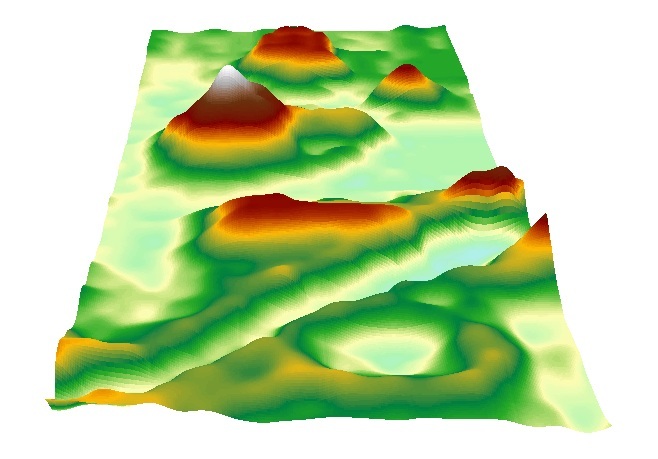
 With the same 5 interpolation methods used with the previous data (IDW, Kriging, Nearest Neighbor, Spline, and a TIN--shown and explained with Figures 5-9), we created various 3D representations of our terrain from which to choose our favorite.  To do this, we uploaded our interpolations from ArcMap into ArcScene just as we had done with the data from last week. As expected, all of the new 3D models were much more accurate and encapsulated all of our major features in much finer detail than with the first models. (Figure 4 and Figure 5).
 
Figure 4
As shown by Figure 4 and 5, the number of data points collected was a huge factor in creating a proper representation of our terrain. Although most of the major features can be seen in both figures, they appear completely different. It almost looks like two entirely different maps. The IDW was not the best interpolation of either of the maps, but the differences between the two grid sizes are clearly presented using this interpolation.

IDW interpolation of the first set of data we collected
using a 10cm by 10cm grid


Figure 5


 IDW: The IDW (Inverse Distance Weighted) interpolation creates values  for unknown points by taking a weighted mean of surrounding known points. Some known points contribute more to the mean than others depending on their proximity to the unknown point. IDW is best used with densely collected data points.


IDW  interpolation of the second set of data 
collected using a 5cm by 5cm grid
 
Figure 6 

Kriging: This interpolation method uses a statistical relationship, known as spatial correlation, among known points to predict unknown points. It "assumes that distance or direction between sample points reflects a spatial correlation that can be used to explain variation in the surface" and uses a mathematical equation to find the unknown points (ArcGIS Help). It is fairly accurate in its predictions because it relies on these statistics.

3D model of our terrain using the Kriging method using a 5cm by cm grid                                                                                              
                                                                                         

                                                                                         Figure 7


Natural Neighbor: In order to find the value of an unknown point, Natural Neighbor takes the values of the nearest known points and creates a weighted average based on proportionate values. Because it only uses the "neighboring" points, the new point will have a value that falls within the range of its neighbors and does not create any new features that aren't already shown with the known points.
                                                                           The terrain mapped using the Natural Neighbor                                                                                                       interpolation method and a 5cm by 5cm grid


Figure 8

Spline: Spline uses a mathematical equation to create a surface that passes through each point collected in the data. Between each point, the surface bends so as to downplay surface curvature.It is best used with data that does not have vastly varying values.


Spline interpolation of our terrain using a 5cm by 5cm
grid
                                                         

                                                                                       Figure 9


TIN: A TIN (Triangulated Irregular Network) takes the data points and connects them using a series of edges to create triangulated surfaces that are all interconnected. TINs are generally used with data points that are in an irregular pattern--unlike the data we collected for this project.


                                                                                     TIN representation of our data using a 5cm by 5cm grid

After viewing the newer, 5cm by 5cm interpolations in ArcScene, we concluded that Kriging was the best representation because it most accurately modeled our real-life terrain. After reading about the different interpolation methods, Kriging seemed to be the most suitable because it uses a statistical method to calculate unknown points and tends to be exact. As far as the aesthetics go, Kriging is among the best interpolations, though it is a bit difficult to see the differences between Kriging, Natural Neighbors, and Spline.


Discussion:

 
Having completed the assignment, it is incredible to see the progression from last week's results to the results of this week. By simply comparing the 3D models with a 10cm by 10cm grid and those with a 5cm by 5cm grid (Figures 4 and 5), it is overly obvious that there was great improvement. My group and I were able to asses our first models, determine the major issues, and resolve them by remapping with a smaller grid size, and ensuring accuracy by employing new measuring techniques.
Despite the fact that the 3D models this week are far superior to the previous models, there are still some uncertainties with the data. Because we had to rebuild our terrain this week, the features are not exactly the same as they were before. Therefore, it is unfair to compare the models from this week and last week as the data isn't the same.  Also, our measuring technique was far more accurate than last week's, but it still was likely to be imperfect as we were rounding to the nearest half centimeter.
 

Conclusion:

 
Through this project, my group and I were able to use critical thinking and improvisation to solve the issues we had with our data and vastly improve our results. We were able to use several interpolation techniques to view our data and chose the Kriging method as our preferred interpolation of our new data. I am very impressed with our final 3D model and feel as though I learned quite a bit about what it means to work in the field. It is very important to be able to work through various obstacles like lack of materials or weather conditions, and also to go back and make improvements to the data.